There was a time when building a hotel or vacation rental website on WordPress meant compromise. You either settled for a simple booking form or outsourced your operations to a SaaS platform. In 2026, that tradeoff feels outdated. MotoPress Hotel Booking positions itself as an all-in-one property management plugin and distinguishes itself from competing solutions. Does it truly dominate? And if so, why? Let’s find answers in our MotoPress Hotel Booking review!
We’ll explore its architecture, workflows, pricing logic, and ecosystem. Let’s analyze why this hotel booking system works and where it stands in today’s market.
MotoPress Hotel Booking: Hands-On Review
Choosing a hotel booking plugin for WordPress often means balancing ease of use with operational control. Let’s see how this tool handles accommodations, pricing, and reservations within one system.
What Is MotoPress Hotel Booking?
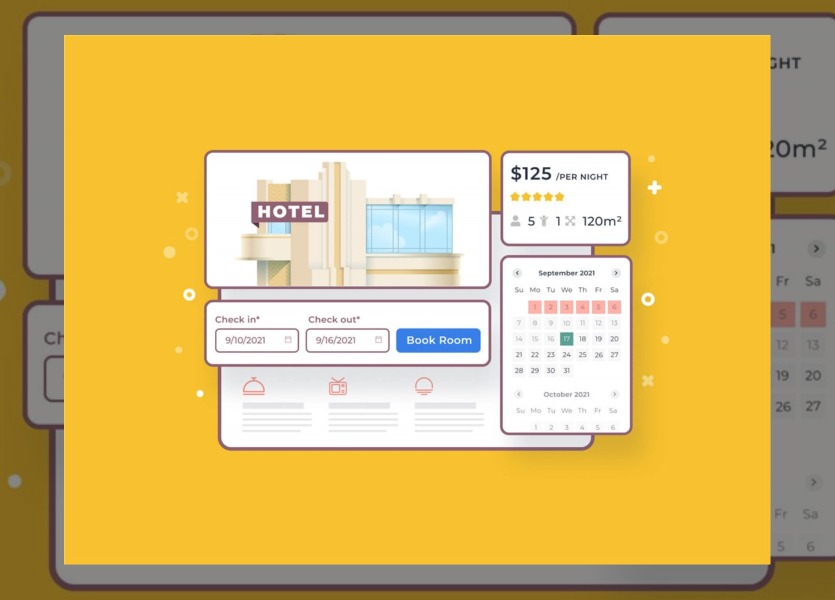
WordPress Hotel Booking plugin by MotoPress is a WordPress plugin designed to manage accommodations and reservations directly on a website. It introduces a structured system for handling properties, rates, availability, and payments inside the WordPress dashboard.
The plugin provides the necessary infrastructure for WordPress users who want direct bookings without relying exclusively on third-party platforms.
Who It’s Best For?
MotoPress Hotel Booking is generally best suited to small and mid-sized hospitality operations. This includes:
- Hotels, hostels, B&Bs, etc.
- Vacation rental property owners.
- Property managers who operate several units under one website.
- Agencies that build accommodation-based websites for clients.
Why It Leads in 2026?
Many booking plugins within the WordPress ecosystem focus on simplicity or narrow functionality. MotoPress Hotel Booking aims to model the full hospitality workflow in WordPress rather than solving just one part of the booking process.
Another factor is its licensing model. The plugin operates without per-booking or per-property commissions, which makes cost forecasting more predictable for independent operators.
Core Features That Matter
The following sections examine the core capabilities that define how the WordPress Hotel Booking plugin by MotoPress operates day-to-day.
Accommodation & Inventory Management
A WordPress hotel booking plugin is largely defined by how it enables you to manage accommodations. In this case:
- The system separates accommodation types (e.g., “Standard Room,” “Two-Bedroom Apartment”) from the actual rentable units under each type. This allows multiple physical rooms to share attributes while maintaining independent availability calendars.
- All bookings appear within a unified admin calendar, displayed in a color-coded format.
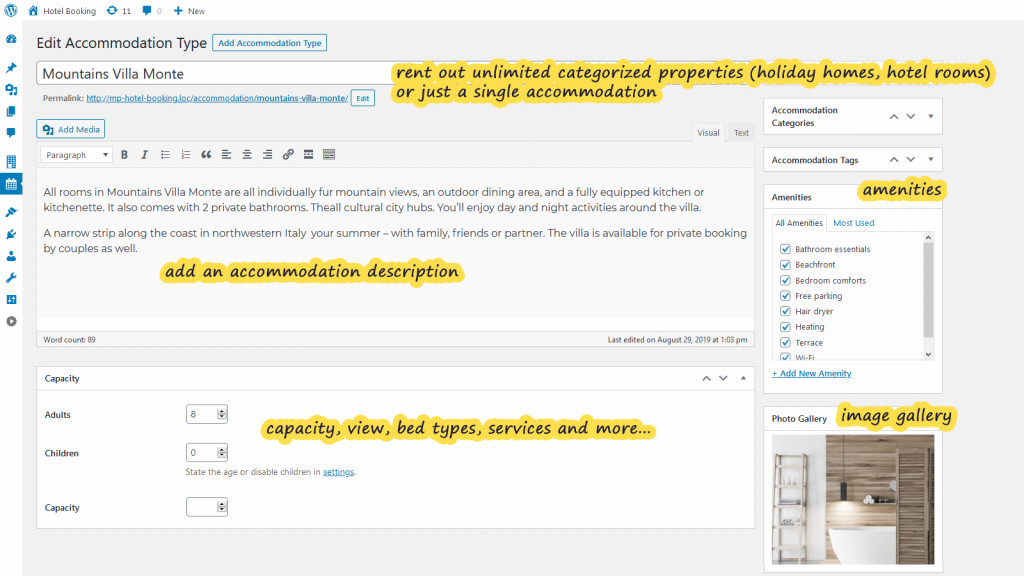
- There is no limit on the number of accommodations that can be added. Properties can be categorized, enriched with amenities, assigned capacity limits, and supplemented with additional services. This makes the system suitable for single-property sites as well as multi-property portfolios.
Advanced Pricing Engine
Pricing flexibility determines whether a WordPress booking engine can support real hospitality operations or only basic rentals. What does MotoPress Hotel Booking offer?
1. Seasonal & Date-Based Pricing
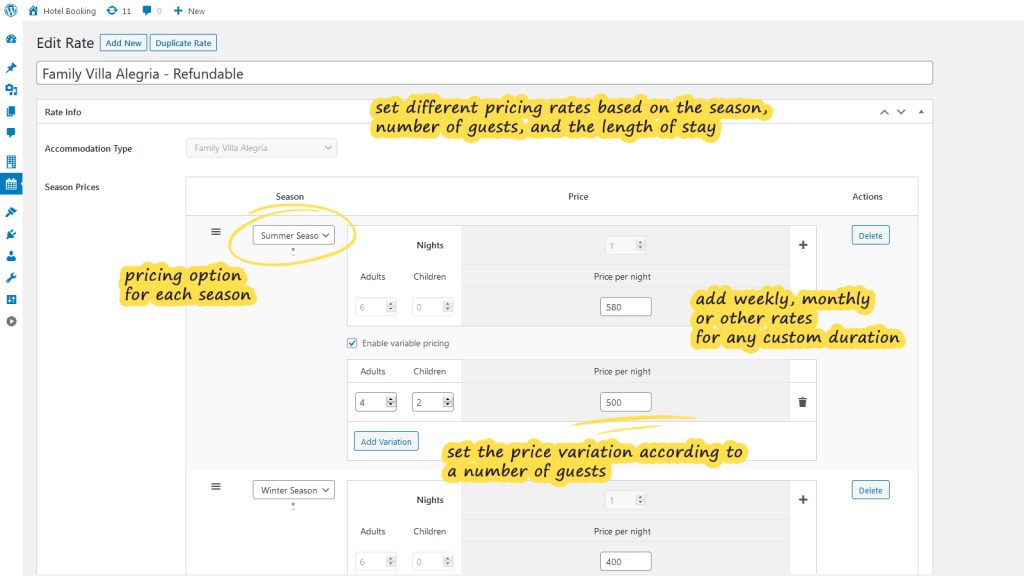
Rates can be defined for custom periods such as high season, low season, holidays, or any specific date range.
2. Rate Adjustments Based on Occupancy and Length of Stay
Pricing can shift depending on the number of guests and the defined stay thresholds.
3. Promotional & Discount Tools
You can add coupons, early-bird discounts, and last-minute offers. When used strategically, this allows property owners to stimulate demand during slower periods or encourage longer stays.
5. Pricing Transparency
Taxes and mandatory fees can be added separately and displayed in the checkout breakdown. This improves clarity for guests and reduces post-booking misunderstandings.
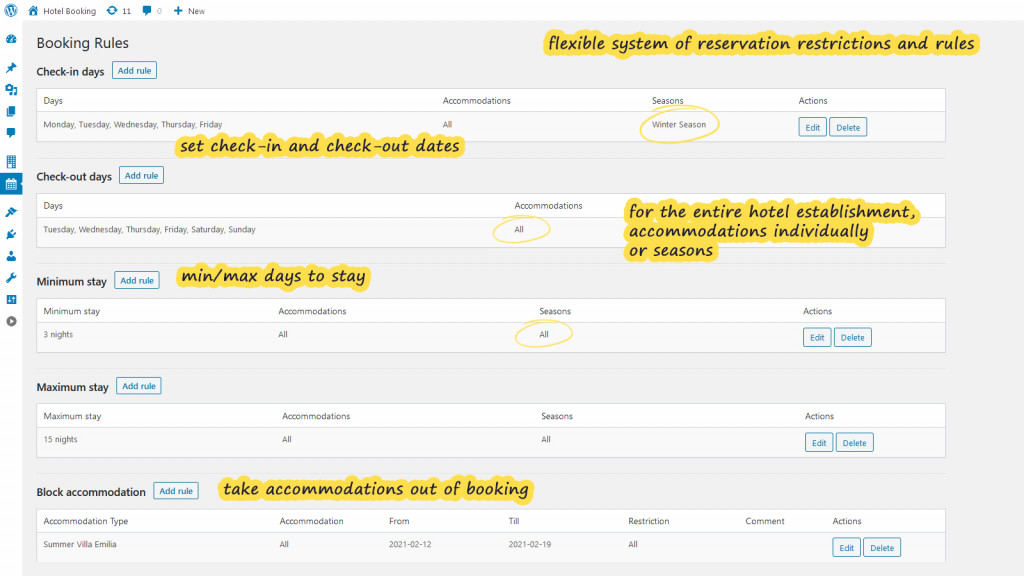
Booking Rules & Availability Control
Operational restrictions in a WordPress hotel booking plugin are essential in hospitality environments. They help create a rule-based availability system.
1. Minimum & Maximum Stay Requirements
Stay duration limits can be applied globally, per accommodation, or per season. This supports revenue optimization and compliance with local rental regulations.
2. Check-In/Check-Out Constraints
Specific days can be restricted for arrival or departure, which is particularly useful for properties with fixed turnover schedules.
3. Linked Accommodations
Units can be connected so that booking one automatically blocks related listings. This is useful when properties share physical space or resources.
4. Temporary Blocking & Maintenance Periods
Accommodations can be removed from availability for renovations, repairs, or internal use without deleting listings.
Payments & Deposits
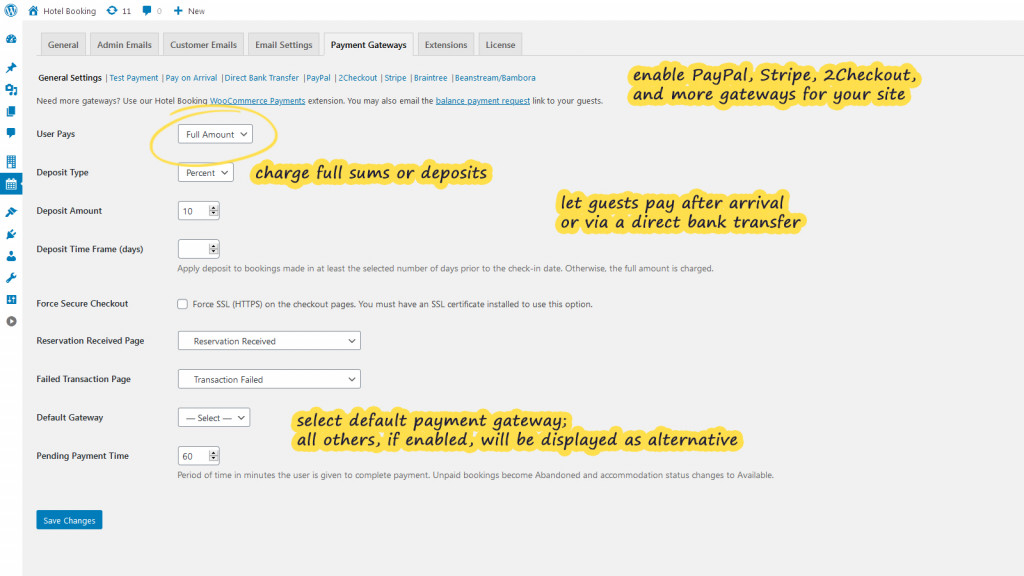
Payment configuration influences both cash flow and reservation security.
1. Flexible Payment Models
MotoPress Hotel Booking options include full payment upfront, fixed deposits, percentage-based deposits, or payment upon arrival.
2. Multiple Gateway Support
Built-in integrations involve PayPal, Stripe, 2Checkout, Braintree, and Beanstream/Bambora. Stripe further supports several regional payment methods such as Bancontact, iDEAL, Giropay, SEPA Direct Debit, and SOFORT, depending on your location and account configuration.
3. Confirmation Logic
Bookings can be confirmed manually, via email validation, or automatically upon successful payment.
4. Transaction Fees
The plugin also includes an option to pass payment processing fees to guests at checkout. Thus, operators can preserve their total booking revenue.
OTA Sync (Airbnb, Booking.com, etc.)
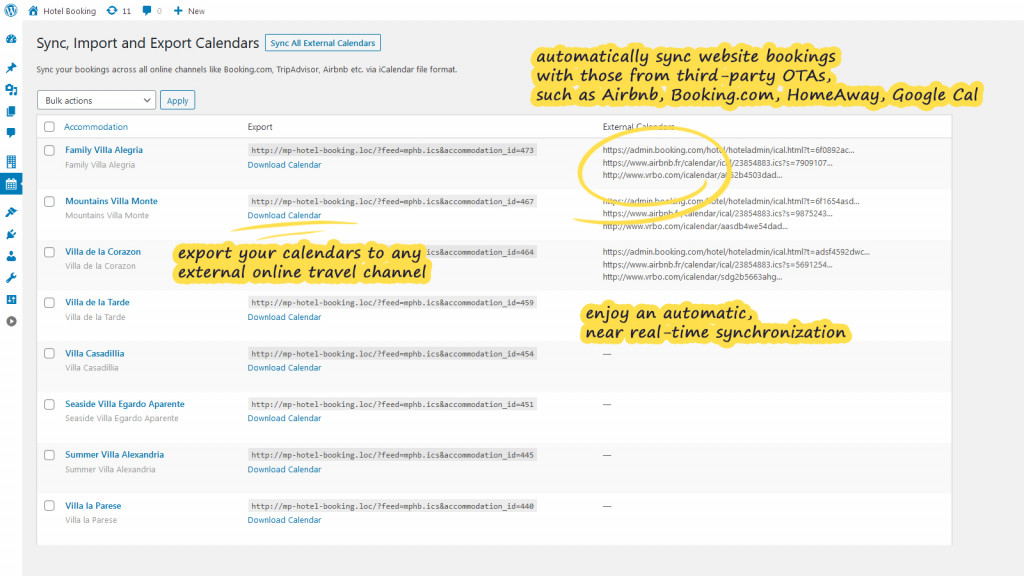
How to avoid double bookings across multiple channels? This WP hotel booking solution supports iCal-based synchronization.
The system generates exportable calendars and imports external availability from platforms that support iCal. For example, Booking.com, Airbnb, Tripadvisor, etc.
Admin & Guest Experience
How does the MotoPress booking system perform for guests making reservations and staff managing them? Let’s review the available options.
1. Guest Booking Flow
From the visitor’s perspective, the process follows a familiar structure: search availability, review accommodation details, select dates, and complete checkout. Filters can be added to refine results across multiple properties.
2. Availability Visualization
Real-time calendars display booked and available dates using status indicators. Guests can assess availability directly from individual property pages or through aggregated search results.
3. Administrative Dashboard
On the backend, all reservations are organized within a centralized calendar. Bookings can be added manually, edited, and exported as CSV reports. Filtering by date, status, or accommodation type simplifies tracking.
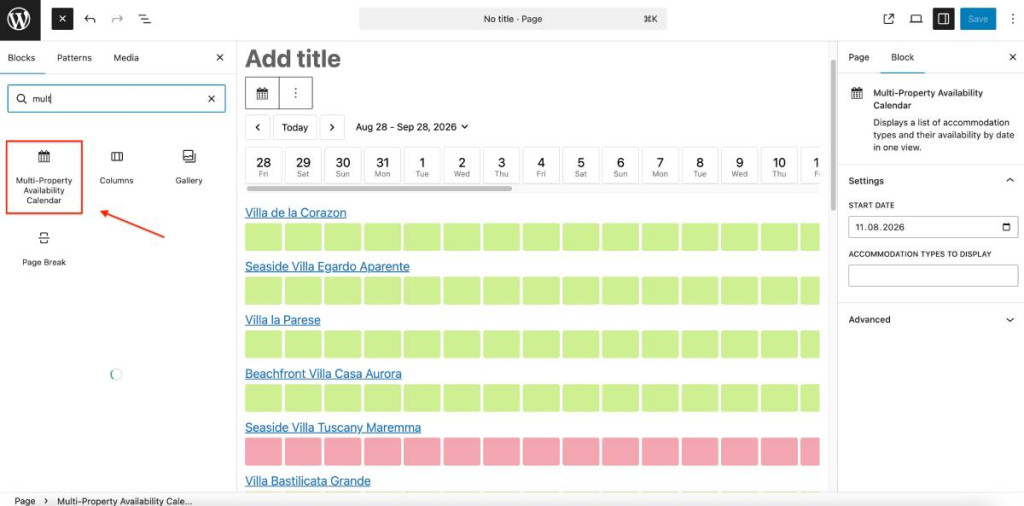
4. Multi-Property Availability Calendar
The plugin allows selected accommodation types to be displayed within a shared availability view. Instead of navigating between individual listings, guests can compare multiple properties within a single layout.
5. Reporting & Operational Oversight
Built-in charts visualize booking trends and revenue across selected periods. These summaries provide quick performance snapshots without leaving the dashboard.
6. Email Communication & Account Management
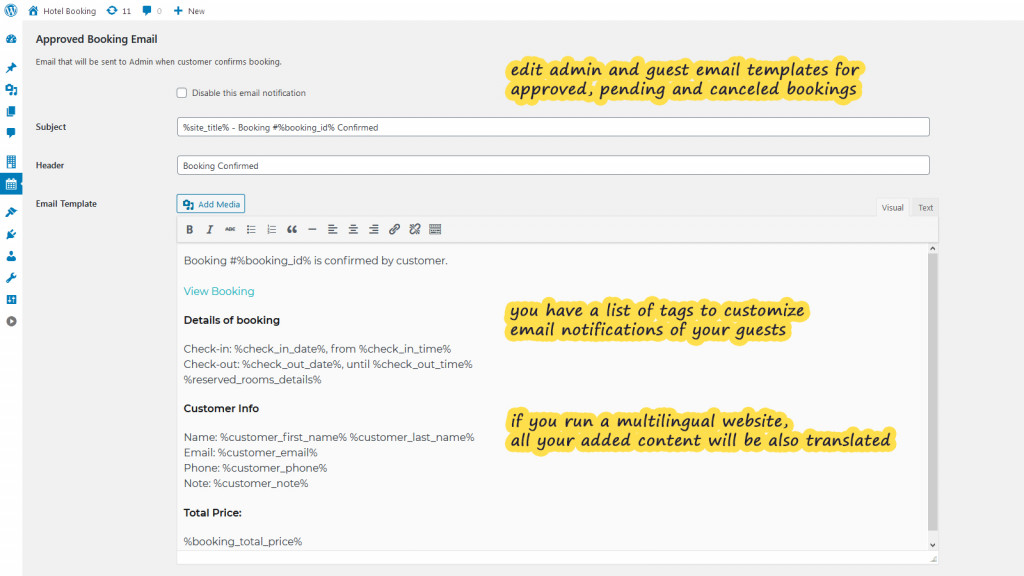
Ready-to-use email templates can be customized, including branding elements. Optional user accounts allow guests to review their bookings.
7. Mobile Application
A dedicated mobile app is available for both iOS and Android. It allows administrators to check availability, add reservations, and view booking or payment details remotely. The app focuses on core management actions for on-the-go monitoring rather than full configuration control.
The Ecosystem Advantage
Long-term viability of the plugin depends on how it can expand for growing operational needs. MotoPress Hotel Booking approaches this through a modular ecosystem. Let’s discover the available tools.
Add-ons That Extend Revenue & Operations
Beyond its core functionality, the WordPress hotel reservation plugin can be extended through add-ons. These extensions address operational flexibility, revenue optimization, payment control, marketing automation, and frontend customization.

The current Hotel Booking add-ons portfolio includes:
- Hotel Booking WooCommerce Payments – connects WooCommerce payment gateways to the booking system.
- Hotel Booking Payment Request – enables automatic collection of full payments or manual upfront payment requests.
- Hotel Booking PriceLabs Integration – synchronizes rates with PriceLabs for automated dynamic pricing.
- Hotel Booking & Mailchimp Integration – subscribes guests to Mailchimp lists after booking.
- Hotel Booking Notifier – triggers automated emails based on arrival or departure dates.
- Hotel Booking Checkout Fields – customizes booking and checkout form fields.
- Hotel Booking PDF Invoices – generates automated PDF invoices for reservations.
- Hotel Booking Multi-Currency – allows visitors to switch displayed currencies.
- Hotel Booking Reviews – introduces a structured five-star property rating system.
- Hotel Booking Accommodation-Based Payments – enables custom payment methods per accommodation type.
- Hotel Booking & Elementor Integration – ensures compatibility with Elementor layouts.
- Hotel Booking & Divi Integration – ensures compatibility with Divi.
Add-ons can be purchased individually, but they are also available in bundled packages. These bundles combine the core plugin with a selection of premium extensions. It’s a consolidated licensing option for businesses planning to use multiple enhancements from the outset.
Builder & Theme Compatibility
Design flexibility remains essential within WordPress-based hospitality sites. Compatibility is structured across multiple editing environments:
- Native Gutenberg blocks;
- Elementor integration extension;
- Divi integration extension;
- Classic shortcode-based integration.
Booking components inherit styling from the active hotel theme, which minimizes visual disruption.
Vacation Rental WordPress Themes
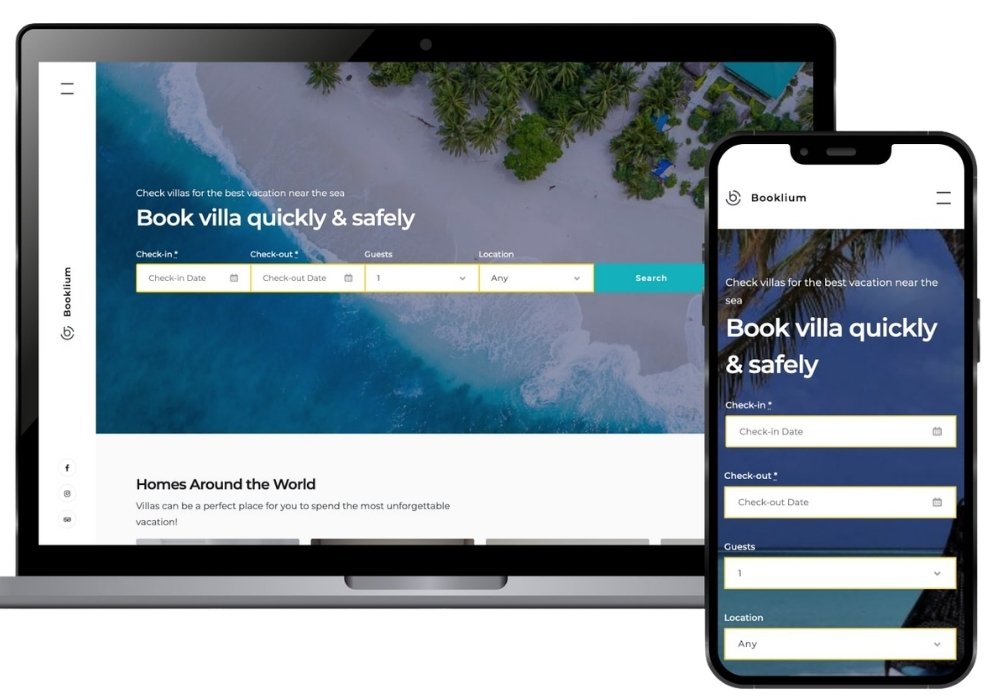
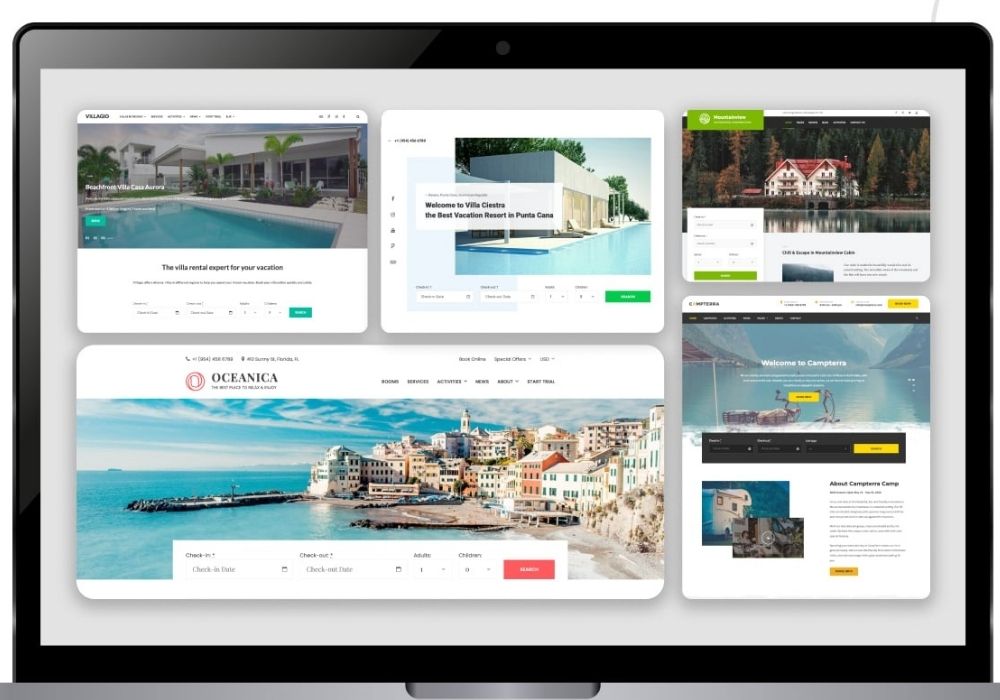
It’s worth noting that the MotoPress lineup includes a set of ready-to-go vacation rental WordPress themes that combine a professional design and the functionality of their WP hotel booking plugin.
These themes target different hospitality niches to let owners choose layouts aligned with their property type:
- Booklium – for boutique b&b and charming guesthouse websites;
- Luviana – for contemporary hotel and urban stay websites;
- Oceanica – for coastal resorts and leisure retreats;
- Alpenhouse – for modern apartments and holiday rentals;
- Villagio – for villas and vacation estates;
- Ciestra – for flexible short-term rental properties;
- Aquentro – for single-property showcases;
- Campterra – for glamping, camping, and nature retreats;
- Petotel – for pet boarding, pet hotels, and care services;
- Mountainview – for destination cabins and scenic vacation rentals.
The Setup Experience & Learning Curve
Deploying a structured booking system inside WordPress inevitably requires time and planning. MotoPress Hotel Booking is no exception.
1. Initial Setup
After activation, users should define accommodation types, generate units, configure seasons, build rate structures, apply booking rules, and connect payment gateways. For small properties, this may take a few hours. For multi-property setups, it can take considerably longer.
2. Pricing Logic Requires Attention
Where many users spend the most time is in the pricing configuration. The system is flexible, but flexibility increases the risk of configuration mistakes during early implementation.
3. Interface Density
The admin panel is comprehensive but not minimal. Multiple tabs and configuration layers may feel overwhelming for users expecting a “plug-and-play” experience.
4. Documentation & Support
Extensive documentation is available, and most configuration steps are covered in detail.
5. Optional Initial Configuration Service
MotoPress offers an Initial Configuration service for operators who prefer a faster launch or lack internal technical resources. Through this paid service, their team assists with setting up core elements such as seasons, rates, and booking rules based on provided requirements. While not essential, it can reduce setup friction for time-sensitive projects.
Overall, the learning curve is moderate. The system demands structured thinking upfront, but that investment translates into stronger operational control later.
Pricing & Value in 2026
Evaluating pricing is an essential part of our MotoPress Hotel Booking review. Unlike SaaS booking platforms that charge recurring monthly fees or take per-booking commissions, MotoPress follows a license-based model. Users pay annually or opt for lifetime access.
| Option | Price |
|---|---|
| 1 Site (annual) | $139 |
| Up to 25 Sites (annual) | $199 |
| 1 Site (lifetime) | $499 |
Also, there is a free version of the plugin available with core booking functionality, such as:
- Accommodation management;
- Basic seasonal pricing;
- Availability calendars;
- PayPal payments;
- Booking rules.
Bundle Packages
Beyond standalone licensing, the MotoPress Hotel Booking WordPress plugin is also available in bundled packages. They combine the core plugin with premium add-ons at a discounted price:
| Option | Price |
|---|---|
| 1 Site (annual) | $199 |
| Up to 25 Sites (annual) | $249 |
| 1 Site (lifetime) | $499 |
| Up to 25 Sites (lifetime) | $1199 |
MotoPress Hotel Booking Review: Pros & Cons
There is no one-size-fits-all booking solution for all properties. Once this MotoPress Hotel Booking plugin review is done, we can make a balanced overview of where it performs strongly and where limitations may appear depending on business needs.
Pros:
- Supports both single and multi-room or multi-property setups.
- Handles seasonal rates, dynamic adjustments, and discounts within one framework.
- Does not charge booking-based fees, which benefits direct booking strategies.
- iCal-based sync helps reduce double-booking risks across platforms like Airbnb and Booking.com.
- Addons allow expansion without overloading the base system.
- Works with Gutenberg, Elementor, and Divi to make integration adaptable across site designs.
- Centralized dashboard to streamline property management.
- Purpose-built WordPress themes for different property types.
- Compatible with WPML and pre-translated into multiple languages.
- Integration with popular services like PriceLabs and MailChimp.
- Bundled packages combine the core plugin with premium addons.
- 7-day free trial (premium demo access) to explore advanced features before committing to a paid license.
Cons:
- Initial configuration requires deliberate setup.
- iCal sync focuses on availability rather than advanced rate parity across channels.
- Some functionality (multi-currency, payment request, or invoices) depends on separate extensions.
- No multi-vendor support to create a marketplace-style website with multiple independent vendors.
Final Verdict: Is It the Best WordPress Hotel Booking Plugin?
To conclude this MotoPress Hotel Booking review, the plugin stands out as one of the most complete booking systems available within the WordPress environment.
In 2026, few WP alternatives offer the same combination of structure, pricing model, ecosystem, and operational depth. For operators committed to running direct bookings through their own site, MotoPress Hotel Booking remains a long-term solution.
Before committing to a license, you can opt for a free trial to test how its booking flow works in your own environment.
FAQ
Yes, you can create and customize unlimited accommodation types with the plugin.
The plugin includes major gateways like PayPal, Stripe, Braintree, and Beanstream/Bambora out of the box. If you need additional local or region-specific payment methods, you can extend functionality via the WooCommerce Payments add-on, which unlocks access to a broader gateway ecosystem.
Yes, the plugin is translated into 18+ languages and compatible with translation plugins like WPML. Also, you can enable multi-currency display via a dedicated addon to allow guests view prices in different currencies.